Red video windows when using SecuritySpy 5.1 as a viewer

I have a registered copy of SecuritySpy running on a 2018 Mac Mini and use unregistered copies on several Macbook Pros as viewers that connect to the Mini. I just installed SS 5.1 on them. On the Mini everything looks fine. But on the MBPs the camera windows a lot of the time are solid red. Sometimes the camera video will appear and stay for a while. Sometimes it flickers red. Here's a screen capture of it: 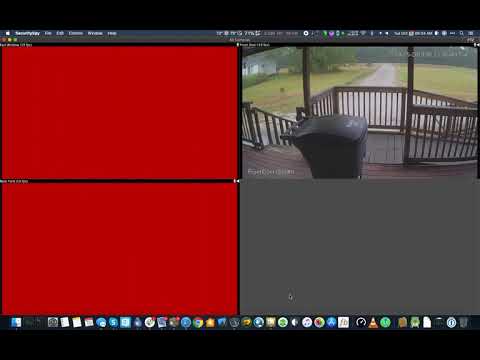 https://youtu.be/iyanqiukKvM
All of them are running macOS 10.15.
https://youtu.be/iyanqiukKvMAll of them are running macOS 10.15.
Comments
-
Just came to report something similar. I've an old 640 x 480 camera pointed at the cat litter tray -- honestly! :-)
On a 2018 Mac Mini (server) and a 2012 Mac Pro 5,1 (as occasional viewer) the litter tray camera is solid green.
Both machines are running macOS Mojave 10.15.6
I've reverted to the previous version of SecuritySpy for now. -
Sorry about this, it sounds like a problem with the new Metal-based video previews. I'm not quite sure why this would happen - we tested this on many different Mac models before release. To confirm this suspicion, please download and install the latest beta version of SecuritySpy (currently 5.1.1b1), open it, then do this:
- Click the SecuritySpy menu
- From the Debug submenu, check the option "Disable Metal For Video Previews"
- Quit and reopen SecuritySpy
Does this cause the video display to work properly? -
Hi Ben
Works purrfectly with Metal disabled for me. (Both Macs.) -
Confirmed - Fine with metal disabled
-
Sorry, Ben. I still get a green preview window (both machines).
-
Turning Metal off in b3 fixes it for me. Unfortunately, turning Metal back on causes the red to come back.