Question about "Exporting Selection" of video from browser

I'm trying to export a two minute video capture selection from a 1 hour continuous capture. The manual says to hold down the shift key and drag the cursor. It's either not working or I don't understand where I'm supposed to click and drag while holding the shift key. Either the entire 1 hour video gets selected or nothing at all. I don't see any visual indication that a portion of the 1 hour video can be selected. Any help would be appreciated. Thanks.
Comments
-
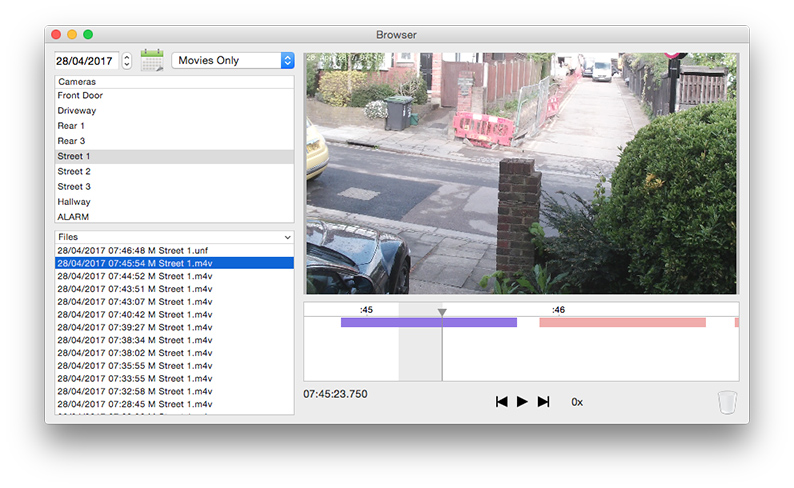
Here are two screenshots to demonstrate how to make a selection in the Browser:
1. Move the time cursor to the start of the selection (click and drag it using the triangle at the top, as highlighted in red in the screenshot).
2. Hold the shift key on the keyboard and move the time cursor to the end of the selection.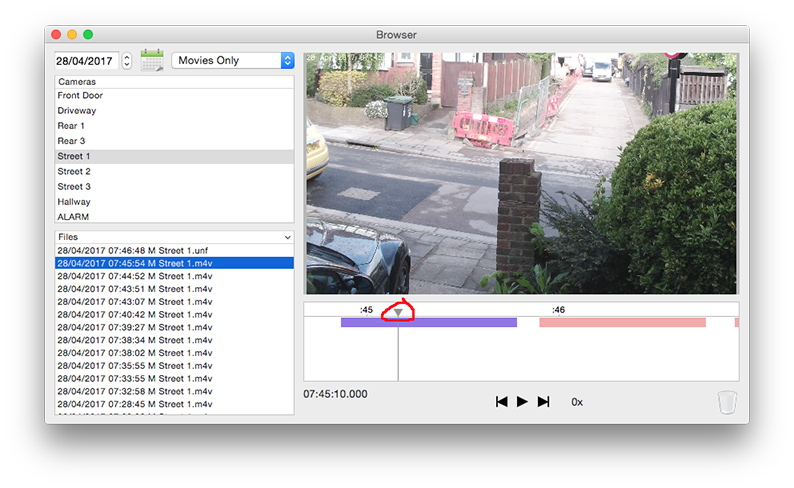
-
Thanks, Ben, for the answer and your incredibly rapid support response.
I guess what was throwing me was that there's no visual indication on the timeline that only that 'dragged' segment is selected and ready for export. But it does work.
(I'm using the latest beta version. Other things seem to be good.) -
It's strange that you don't see the visual indication of the selection, sorry about that, perhaps the chosen shade of grey is not different enough from the white background to be easily distinguishable on certain screens. I'll make sure to make it more pronounced in the next update.

