Trigger Settings...

Is there any way to add an algorithm to the AI trigger settings that can help to ignore snow and rain? It only happens at night in the IR light, but I live in an area where we get lots of showers or flurries and I end up with a lot of useless 2 and 3 hour videos.
When the software triggers during storms the capture rectangle is bouncing all over the place, trying to detect each snowflake or rain drop, and the camera is panning and tilting all over the range of movement.
Maybe a setting to ignore triggers that happen more than once every second or two, or triggers that last for only a second or so. This would still allow any legitimate people, vehicle or animal triggers, but cut down on the false triggers. I have messed around with the people, vehicle and animal sensitivity settings and the length of time delay before a trigger registers, but nothing seems to improve this behaviour.
Any suggestions on how to reduce this redundant triggering would be very much appreciated! It is a pain to scan through the long videos to see if there were any legitimate triggers. Not to mention that my computer wakes from sleep every time there is a false trigger.
Thank you for the forum!
Comments
-
Useful feature. I end up turning off the detection when it’s raining
-
Yeah, this is fairly important to me because I live in a rural town and the main reason I got a camera was to track critters in my back yard. Last year some animal took not one but both of my cats, within a week of each other, and 3 years back I had another cat disappear. I never had this happen until I moved here.
I'm trying to find out what that animal may have been and if it continues to come through my yard. So a fairly specific reason to have a cam. There are few cars and people that come past my place. I hope that they can add this feature, because turning off detection at night would defeat my purpose for having it.
-
This is exactly what SecuritySpy's AI object detection is for - to detect just the objects of interest (humans, vehicles or animals) and to ignore other motion. That said, the accuracy of the detections you will achieve is situational and there are ways to set things up to achieve effective motion detection.
The way this works in SecuritySpy is that there is a first-line pixel-based motion detection algorithm that detects any kind of movement (this itself has several built-in mechanisms to reject false motion, such as a minimum duration requirement). When this detects motion, the image is passed to the AI for classification to detect objects of interest. Only if the AI detects an object will a recording and actions be triggered.
However, the extreme conditions you are describing may be causing near-constant motion. SecuritySpy's AI detection is around 97% accurate - about as accurate as an AI image classifier can be. But, if you get thousands of instances of motion overnight, while the vast majority will be filtered out by the AI, you sill still end up with a significant number being let through.
So, you have to look at reducing the amount of extraneous motion seen by the camera in the first place. From your description, there are two problems that need addressing. The first is built-in infra-red lighting in the camera that brightly illuminates snow/rain just in front of the camera. This can cause huge amounts of motion that basically cannot be filtered out by any algorithm. The solution here is to turn off the camera's IR lighting, and instead use a separate IR illuminator, some distance from the camera, to shine light on the scene rather than on the space just in front of the camera - something like this:
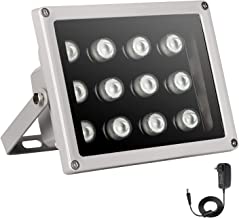
The next thing you describe is the camera "panning and tilting all over the range of movement". Does this mean that you have set the camera's auto-tracking feature to move itself towards motion automatically? This won't work with SecuritySpy's motion detection, as it will look to SecuritySpy like huge amounts of motion as the whole camera moves around unexpectedly. You must turn this feature off.
Ultimately, SecuritySpy's motion detection and AI features are very effective in the right circumstances, so I hope the above will help you to achieve effective motion detection. When you have a situation where there is huge amounts of movement from brightly-lit snow in front of the camera and/or the camera moving itself around, there is no motion-detection algorithm that will be able to deal with this and work effectively.
-
Hi Ben, thanks for responding!
I did not fully understand the delay setting, and thought that if I set it too high that it would miss desired triggers. I currently have it set to 3 seconds. I will try higher settings first and see if this fixes my issue. As I understand it now, the camera detects something and then waits for the set time to decide if it is a legitimate trigger.
Also, I will go into the phone app that came with the camera and see if I can turn off the automatic motion detection there. I did not realize that this setting and the settings in Security Spy were fighting each other.
Hopefully all this will cure my ills. If these factors don't solve things, I can build an array of IR LEDs to light up my yard. I was considering doing this anyway because the built in IR does not cover the far reaches of my yard.
Also, if you want to add another camera to your list of ones that work with your software, you can list GenBolt (~$120CAD on Amazon) as another brand, as it seems to work well with the software, except for what I've been mentioning, but it sounds as if your suggestions will solve my problem.
Thanks again!
Jeff Hohner
-
Hi Jeff - yes the "trigger duration" setting defines the minimum duration that the movement has to last for to be considered motion (and then sent to the AI for classification). The higher this setting, the more resistant the algorithm is to false-positives, but the greater the chance of missing real events. I would say that you don't want to set this higher than around 2.5 seconds, as then the chances of missing real events become quite high.
Also check that the motion detection sensitivity setting is no higher than 50.
In terms of the camera's own motion detection, if this is physically moving the camera around, then this is a big problem. When SecuritySpy itself initiates PTZ movements, it shuts of its own motion detector briefly until the PTZ movement completes, to avoid the moving image causing motion detection. But it can't do this for PTZ movements that are initiated by the camera itself. So this feature (and any other camera-initiated auto-patrol PTZ feature) must be turned off in the camera.
I hope this will significantly improve the problem. Making the changes to the LED lighting is the next step, and this will really help both the motion detection accuracy, and the quality of the camera's images at night.
-
Thanks Ben, I will try these settings. I have disabled the phone app settings so it will not fight with Security Spy. I'm also going to build a solar powered IR LED array to place in my back yard, so I don't have to worry about changing batteries or plugging it in.
Now I just have to wait for a snow storm to pass through...
Cheers,
Jeff
-
I too have this problem - I live in a forest like condition where wind as well as snow, as well as rain causes me problems. Thanks for the tips.... This should help
Keep up the great work Ben
Dale

