Base M2 Tests

The new Mac mini M2 is likely going to be really great for SecuritySpy... It isn't in our hands yet, but does anyone have a MacBook Air M2? If you ran Ben's Video Codec Test it should give us an idea how the Mac mini M2 will perform. I know MacBook's don't show up in the performance comparison page, since they don't really make sense to run SecuritySpy on in real life, but for purposes of comparing, the results of the MacBook Air M2 should be nearly identical to the Mac mini M2, right?
(The only difference I could think of would be if the Air throttled its performance due to heat, especially if all the tests were run back-to-back.)
If anyone is taking requests, 4K H.265 decode performance in both software and hardware separately is my biggest curiosity. 😇
Comments
-
I ran all tests on a 2022 MacBook Air M2 w/16 GB.
I borrowed the laptop for long enough to run the tests, but didn't have time for a repeat, and had to leave Safari running at the owner's request, due to work being performed on a few open webpages.
I did allow the app to report the results to Ben.
The results:
Mac model: Mac14,2
macOS version: 13.1
CPU description: Apple M2
CPU type: Arm
CPU nominal frequency: 0.0 GHz
CPU physical core count: 8
CPU logical core count: 8
GPU description: Unknown
RUN 1: Decode H.264 2K
SW threads: 0, iHW threads: 0, eHW threads: 0
Throughput: 1027 fps, Frames: 19593, CPU: 31 %
RUN 2: Decode H.264 2K
SW threads: 0, iHW threads: 8, eHW threads: 0
Throughput: 533 fps, Frames: 10051, CPU: 97 %
RUN 3: Decode H.264 2K
SW threads: 8, iHW threads: 0, eHW threads: 0
Throughput: 1041 fps, Frames: 20844, CPU: 30 %
RUN 4: Decode H.264 2K
SW threads: 0, iHW threads: 8, eHW threads: 0
Throughput: 1083 fps, Frames: 20325, CPU: 98 %
RUN 5: Decode H.264 4K
SW threads: 8, iHW threads: 8, eHW threads: 0
Throughput: 359 fps, Frames: 6730, CPU: 96 %
RUN 6: Decode H.264 4K
SW threads: 8, iHW threads: 0, eHW threads: 0
Throughput: 491 fps, Frames: 9246, CPU: 37 %
RUN 7: Decode H.264 4K
SW threads: 0, iHW threads: 8, eHW threads: 0
Throughput: 654 fps, Frames: 12017, CPU: 98 %
RUN 8: Decode H.265 2K
SW threads: 8, iHW threads: 8, eHW threads: 0
Throughput: 755 fps, Frames: 14203, CPU: 98 %
RUN 9: Decode H.265 2K
SW threads: 8, iHW threads: 0, eHW threads: 0
Throughput: 2429 fps, Frames: 45943, CPU: 31 %
RUN 10: Decode H.265 2K
SW threads: 0, iHW threads: 8, eHW threads: 0
Throughput: 1859 fps, Frames: 35598, CPU: 99 %
RUN 11: Decode H.265 4K
SW threads: 8, iHW threads: 8, eHW threads: 0
Throughput: 544 fps, Frames: 10347, CPU: 96 %
RUN 12: Decode H.265 4K
SW threads: 8, iHW threads: 0, eHW threads: 0
Throughput: 634 fps, Frames: 12003, CPU: 29 %
RUN 13: Decode H.265 4K
SW threads: 0, iHW threads: 8, eHW threads: 0
Throughput: 1006 fps, Frames: 18801, CPU: 99 %
RUN 14: Encode H.264 2K
SW threads: 8, iHW threads: 8, eHW threads: 0
Throughput: 153 fps, Frames: 2768, CPU: 99 %
RUN 15: Encode H.264 2K
SW threads: 8, iHW threads: 0, eHW threads: 0
Throughput: 176 fps, Frames: 3408, CPU: 27 %
RUN 16: Encode H.264 2K
SW threads: 0, iHW threads: 8, eHW threads: 0
Throughput: 335 fps, Frames: 6227, CPU: 99 %
RUN 17: Encode H.264 4K
SW threads: 8, iHW threads: 8, eHW threads: 0
Throughput: 32 fps, Frames: 573, CPU: 99 %
RUN 18: Encode H.264 4K
SW threads: 8, iHW threads: 0, eHW threads: 0
Throughput: 51 fps, Frames: 1003, CPU: 24 %
RUN 19: Encode H.264 4K
SW threads: 0, iHW threads: 8, eHW threads: 0
Throughput: 82 fps, Frames: 1512, CPU: 98 %
RUN 20: Encode H.265 2K
SW threads: 8, iHW threads: 8, eHW threads: 0
Throughput: 12 fps, Frames: 238, CPU: 99 %
RUN 21: Encode H.265 2K
SW threads: 8, iHW threads: 0, eHW threads: 0
Throughput: 188 fps, Frames: 3644, CPU: 28 %
RUN 22: Encode H.265 2K
SW threads: 0, iHW threads: 8, eHW threads: 0
Throughput: 206 fps, Frames: 4000, CPU: 99 %
RUN 23: Encode H.265 4K
SW threads: 8, iHW threads: 8, eHW threads: 0
Throughput: 0 fps, Frames: 0, CPU: 100 %
RUN 24: Encode H.265 4K
SW threads: 8, iHW threads: 0, eHW threads: 0
Throughput: 88 fps, Frames: 1745, CPU: 27 %
RUN 25: Encode H.265 4K
SW threads: 0, iHW threads: 8, eHW threads: 0
Throughput: 89 fps, Frames: 1776, CPU: 100 %
-
Oh wow, thanks very much!
I’m going to pore over those numbers a bit, but from what I see it looks like the base M2 can indeed decode 4k H.265 at 600+ frames per second entirely in hardware, without any software CPU decoding!
I noticed that the current version of the test utility’s output doesn’t seem to report the threads correctly as to whether they are SW or HW or both, it’s a jumble, but based on the frame rate and the CPU usage, it’s pretty easy to figure out, at least for all the 4k tests, which one is running on both (highest frame rate) vs the CPU (near total CPU usage) vs the GPU (very low CPU usage).
Thanks again for running that!
-
I'd like to see runs 11, 12 & 13 with 8 and 24 GB RAM for comparison.
-
Looks like the base Mini M2 has 10 core GPU, vs. 8 on the Air I tested.
Both have 8 core CPU and 16 core Neural Engine.
-
I've just notice that some of the feedback in the Video Codec Test app about where the processing is being done is wrong. With the "Run all tests" process, for each combination of resolution and codec, the order is: 1. Software processing only, 2. Hardware processing only, 3. Software plus hardware processing. This isn't correctly reflected in the "SW threads" and "iHW threads" numbers and these should be ignored. This has now been fixed in the v1.3 update to this app.
The results above look very good. This Mac is able to decode 4K H.264 video data in hardware at more than 600fps in hardware alone (with no CPU usage), and 1000fps with software and hardware decoding combined (with 100% CPU usage; in real-word this would not be achievable, but something like 800fps with 50% CPU usage would be reasonable, leaving half the CPU power for other tasks).
-
So, to put this another way, would 800fps turn into an assumption of an M2 being able to stream 80 4k cameras at 10fps per camera? That seems a bit high - I don't quite believe that figure. Unless that just assumes no motion detection or other "work" like transformations being done on the streams. What is the "overhead" per camera stream that needs to be taken out of the total frame-per-second summary?
-
Great! I’ll update the utility. I noticed that it had the threads mixed up even when I did individual tests. For myself I never do All Tests, I just do the ones I’m interested in. But they’re still mixed up. But since I was doing them for myself, I knew what test I’d just run, so I ignored them. haha
With a report from someone else, though, it got a little trickier!
-
Hi @jtodd - yes, this means 80x 4K cameras at 10fps each. You're right that this is at the optimistic end of the performance prediction, and factors such as the complexity of the video stream, as well as other competing tasks being carried out by the Mac, can significantly affect this. But note that the Video Codec Test app comes to its number by actually decoding real 4K video data as fast as possible and simply reporting the results. The video data it uses comes from a real CCTV camera.
Our calculator subtracts a 30% margin from this number when making recommendations, and overall we have found this to yield reasonable real-world predictions.
-
I wonder how AV1 will perform in the future
-
AV1 decoding on our Macs for SecuritySpy will have to wait for the cam makers to build a capable AV1 encoding chip into their cameras, and for ONVIF to adopt AV1 as a standard.
It sounds like that may take several more years, but it will eventually happen.
Unless AV2 happens first.
-
Just picked up my base model 8GB/256GB M2 mini earlier, all set with securityspy installed. running the codec test for you now.
-
Mac model: Mac14,3
macOS version: 13.2
CPU description: Apple M2
CPU type: Arm
CPU nominal frequency: 0.0 GHz
CPU physical core count: 8
CPU logical core count: 8
GPU description: Unknown
RUN 1: Decode H.265 4K
Software processing
Throughput: 540 fps, Frames: 10102, CPU: 99 %
RUN 2: Decode H.265 4K
Internal hardware processing
Throughput: 635 fps, Frames: 12008, CPU: 39 %
RUN 3: Decode H.265 4K
Software and internal hardware processing
Throughput: 936 fps, Frames: 17552, CPU: 100 %
-
Doesn't look like the 16 GB RAM on the Air gave much of an improvement in the H265 4K decoding frame rate, compared to the Mini with 8 GB RAM.
@Ben, I'd be interested in hearing your ideas on whether bumping the RAM to 16 might be helpful for other processes, like running the server.
-
Thanks everyone for your feedback. We have now gathered enough data to add the new M2 Pro mini to our System Requirements Calculator. The performance and value of this machine is very impressive! We are still waiting for enough data on the base-level M2 mini and will add that when we can.
@Sawmill - to answer your question, more RAM won't affect the decoding performance for these isolated tests, but will most likely improve real-world performance for the machine as a whole - this can potentially help with all the tasks that SecuritySpy, and everything else running on the Mac, is doing. 16 GB is definitely preferred over 8 GB if budget allows.
-
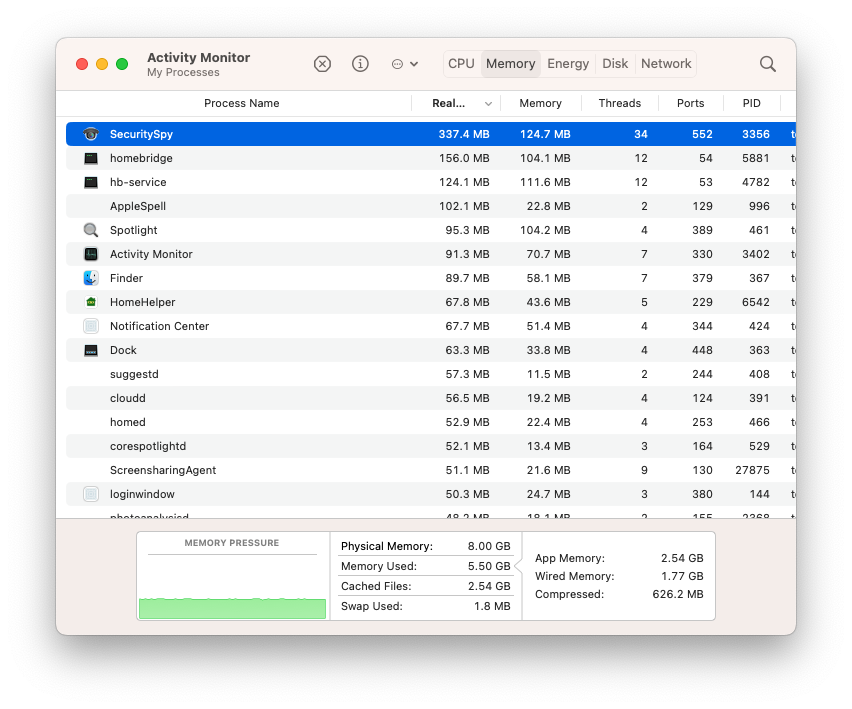
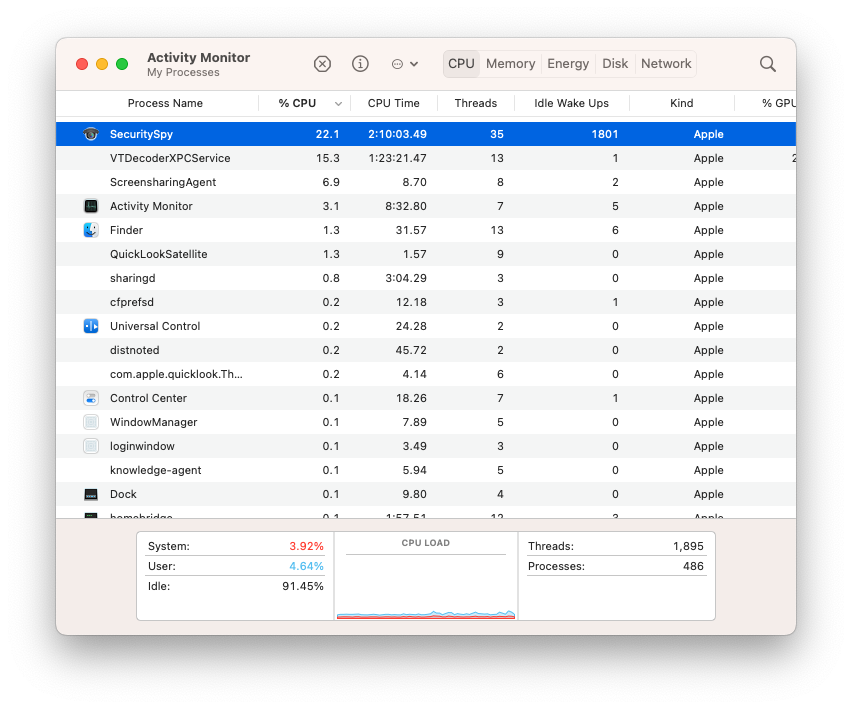
@Sawmill I got the base 8GB model since it was in stock. With four cameras, homebridge, and homehelper running it's using 5.5GB and CPU very light. So it's doable but agree with Ben if you've got the money 16GB worth it for the long haul. I've got 14 days to return, might swap out and upgrade since I plan on keeping this little guy for a long time.
-
Decisions, decisions.
Does the Pro offer enough additional capacity to justify its additional cost over the base model?
The base model with 16 GB RAM should be fine for me, even when I add more cameras to the 7 I already have, or start bumping them up past the 4K resolution.
If the $800 Mini lasts for 4 years, it's $200/year.
And in 4 years, I'll see what the M6 Minis look like.
-
I have the 13" Macbook Air with 24GB of ram, 8 core cpu with 10 gpu cores. The numbers I got look a little higher that what's been posted here so far..
Mac model: Mac14,2
macOS version: 12.6.2
CPU description: Apple M2
CPU type: Arm
CPU nominal frequency: 0.0 GHz
CPU physical core count: 8
CPU logical core count: 8
GPU description: Unknown [EDIT - 10 gpu cores]
RUN 1: Decode H.264 2K
Software processing
Throughput: 575 fps, Frames: 10862, CPU: 96 %
RUN 2: Decode H.264 2K
Internal hardware processing
Throughput: 1275 fps, Frames: 24122, CPU: 21 %
RUN 3: Decode H.264 2K
Software and internal hardware processing
Throughput: 1186 fps, Frames: 22470, CPU: 99 %
RUN 4: Decode H.264 4K
Software processing
Throughput: 379 fps, Frames: 7255, CPU: 99 %
RUN 5: Decode H.264 4K
Internal hardware processing
Throughput: 486 fps, Frames: 9191, CPU: 16 %
RUN 6: Decode H.264 4K
Software and internal hardware processing
Throughput: 688 fps, Frames: 12833, CPU: 99 %
RUN 7: Decode H.265 2K
Software processing
Throughput: 722 fps, Frames: 14078, CPU: 99 %
RUN 8: Decode H.265 2K
Internal hardware processing
Throughput: 2430 fps, Frames: 45991, CPU: 14 %
RUN 9: Decode H.265 2K
Software and internal hardware processing
Throughput: 2059 fps, Frames: 39197, CPU: 98 %
RUN 10: Decode H.265 4K
Software processing
Throughput: 566 fps, Frames: 10759, CPU: 91 %
RUN 11: Decode H.265 4K
Internal hardware processing
Throughput: 633 fps, Frames: 11958, CPU: 10 %
RUN 12: Decode H.265 4K
Software and internal hardware processing
Throughput: 1023 fps, Frames: 19334, CPU: 99 %
RUN 13: Encode H.264 2K
Software processing
Throughput: 163 fps, Frames: 2958, CPU: 99 %
RUN 14: Encode H.264 2K
Internal hardware processing
Throughput: 182 fps, Frames: 3504, CPU: 8 %
RUN 15: Encode H.264 2K
Software and internal hardware processing
Throughput: 356 fps, Frames: 6711, CPU: 99 %
RUN 16: Encode H.264 4K
Software processing
Throughput: 45 fps, Frames: 786, CPU: 99 %
RUN 17: Encode H.264 4K
Internal hardware processing
Throughput: 51 fps, Frames: 1035, CPU: 5 %
RUN 18: Encode H.264 4K
Software and internal hardware processing
Throughput: 95 fps, Frames: 1751, CPU: 99 %
RUN 19: Encode H.265 2K
Software processing
Throughput: 14 fps, Frames: 268, CPU: 97 %
RUN 20: Encode H.265 2K
Internal hardware processing
Throughput: 186 fps, Frames: 3627, CPU: 9 %
RUN 21: Encode H.265 2K
Software and internal hardware processing
Throughput: 210 fps, Frames: 4052, CPU: 99 %
RUN 22: Encode H.265 4K
Software processing
Throughput: 0 fps, Frames: 0, CPU: 99 %
RUN 23: Encode H.265 4K
Internal hardware processing
Throughput: 86 fps, Frames: 1714, CPU: 7 %
RUN 24: Encode H.265 4K
Software and internal hardware processing
Throughput: 88 fps, Frames: 1745, CPU: 99 %
-
@Sawmill it's unclear what the video processing performance difference will be between the M2 vs. the M2 Pro - once we find out I'll post back information here and also update our calculator so that it will be easy to use this to compare. I suspect the hardware-accelerated performance will be the same between the M2 and the M2 Pro, because they have the same Media Engine module that is doing this work. The M2 Pro has a faster CPU, so this will certainly make a difference, but not a huge difference. The "basic" M2 is already extremely capable!
-
My existing Mini is Late 2014 3GHz i7 w/16GB RAM. It doesn't do hardware H265 decoding at all, and Run 5 says it's hardware decoding H264 4K at 133 fps.
I imagine going from 133 fps H264 to 633 fps H265 will be a big jump.
I haven't ordered it yet, but leaning towards the Base model with 16 GB RAM.
-
Didn't make the edit window, but have now ordered the base model with 16 GB RAM.
Just switching from H264 to H265 should decrease my WiFi bandwidth usage by 50% or so, if I am understanding the difference between the codecs correctly.
I have WiFi on the Mini turned off and connect to the Eero network via CAT7 cable, which makes the Eeros do all the WiFi work.
-
Good choice - this will indeed be a big jump up from your 2014 mini, and you are correct that switching from H.264 to H.265 should decrease the bandwidth by roughly a factor of 2.
-
Here's the new Base M2 Mini with 16GB Ram:
Mac model: Mac14,3
macOS version: 13.0
CPU description: Apple M2
CPU type: Arm
CPU nominal frequency: 0.0 GHz
CPU physical core count: 8
CPU logical core count: 8
GPU description: Unknown
RUN 1: Decode H.264 2K
Software processing
Throughput: 540 fps, Frames: 10212, CPU: 99 %
RUN 2: Decode H.264 2K
Internal hardware processing
Throughput: 1272 fps, Frames: 24085, CPU: 38 %
RUN 3: Decode H.264 2K
Software and internal hardware processing
Throughput: 1228 fps, Frames: 23464, CPU: 98 %
RUN 4: Decode H.264 4K
Software processing
Throughput: 404 fps, Frames: 7539, CPU: 97 %
RUN 5: Decode H.264 4K
Internal hardware processing
Throughput: 492 fps, Frames: 9259, CPU: 12 %
RUN 6: Decode H.264 4K
Software and internal hardware processing
Throughput: 748 fps, Frames: 13856, CPU: 98 %
RUN 7: Decode H.265 2K
Software processing
Throughput: 801 fps, Frames: 15199, CPU: 88 %
RUN 8: Decode H.265 2K
Internal hardware processing
Throughput: 2426 fps, Frames: 45946, CPU: 10 %
RUN 9: Decode H.265 2K
Software and internal hardware processing
Throughput: 1868 fps, Frames: 37687, CPU: 99 %
RUN 10: Decode H.265 4K
Software processing
Throughput: 593 fps, Frames: 11012, CPU: 91 %
RUN 11: Decode H.265 4K
Internal hardware processing
Throughput: 632 fps, Frames: 11948, CPU: 14 %
RUN 12: Decode H.265 4K
Software and internal hardware processing
Throughput: 1087 fps, Frames: 20288, CPU: 98 %
RUN 13: Encode H.264 2K
Software processing
Throughput: 173 fps, Frames: 3126, CPU: 99 %
RUN 14: Encode H.264 2K
Internal hardware processing
Throughput: 176 fps, Frames: 3395, CPU: 6 %
RUN 15: Encode H.264 2K
Software and internal hardware processing
Throughput: 350 fps, Frames: 6573, CPU: 99 %
RUN 16: Encode H.264 4K
Software processing
Throughput: 46 fps, Frames: 773, CPU: 99 %
RUN 17: Encode H.264 4K
Internal hardware processing
Throughput: 50 fps, Frames: 1002, CPU: 4 %
RUN 18: Encode H.264 4K
Software and internal hardware processing
Throughput: 85 fps, Frames: 1597, CPU: 96 %
RUN 19: Encode H.265 2K
Software processing
Throughput: 17 fps, Frames: 299, CPU: 96 %
RUN 20: Encode H.265 2K
Internal hardware processing
Throughput: 186 fps, Frames: 3617, CPU: 6 %
RUN 21: Encode H.265 2K
Software and internal hardware processing
Throughput: 211 fps, Frames: 4063, CPU: 97 %
RUN 22: Encode H.265 4K
Software processing
Throughput: 0 fps, Frames: 0, CPU: 99 %
RUN 23: Encode H.265 4K
Internal hardware processing
Throughput: 87 fps, Frames: 1751, CPU: 6 %
RUN 24: Encode H.265 4K
Software and internal hardware processing
Throughput: 90 fps, Frames: 1779, CPU: 99 %
-
I had a few problems getting it to work with the 50' of HDMI cable from the Mini to the monitor.
The new Mini, like the old one, could not deliver usable 4K through a 50' HDMI cable to the big LG screen.
The old Mini was able to do it through a Mini Display Port/HDMI adapter. The new Mini does not have a Mini Display Port, so that didn't work. Neither did a Thunderbolt/HDMI adapter.
It worked using the Mini's HDMI port and connecting to a Dell monitor using the 50' cable, though.
With that working, I was able to mirror that display output to an Apple TV 4K connected to the big screen.
In some ways, that's better because the big LG screen is no longer tethered to the 50' HDMI cable, so I have more options on where I can locate it.
-
Thanks for running these tests, we have now gathered enough data to update our calculator with both the M2 and M2 Pro variants of the new 2023 Mac minis. It's clear that both versions are fantastic machines that offer great performance for SecuritySpy. The hardware-accelerated video processing performance of the standard M2 is a big step up from the M1, putting it roughly in the middle between the M1 and M2 Pro. For larger systems and/or higher resolutions and frame rates, the greater performance and RAM capacity of the M2 Pro (32 GB vs. 24 GB) becomes important.
-
Here are the results for the M2 Pro mini 10 core CPU and 16 core GPU with 16 GB ram and 512 SSD.
Mac model: Mac14,12
macOS version: 13.2
CPU description: Apple M2 Pro
CPU type: Arm
CPU nominal frequency: 0.0 GHz
CPU physical core count: 10
CPU logical core count: 10
GPU description: Unknown
RUN 1: Decode H.264 2K
Software processing
Throughput: 776 fps, Frames: 14711, CPU: 98 %
RUN 2: Decode H.264 2K
Internal hardware processing
Throughput: 1197 fps, Frames: 23778, CPU: 12 %
RUN 3: Decode H.264 2K
Software and internal hardware processing
Throughput: 1551 fps, Frames: 29101, CPU: 99 %
RUN 4: Decode H.264 4K
Software processing
Throughput: 590 fps, Frames: 11139, CPU: 98 %
RUN 5: Decode H.264 4K
Internal hardware processing
Throughput: 657 fps, Frames: 12333, CPU: 13 %
RUN 6: Decode H.264 4K
Software and internal hardware processing
Throughput: 1068 fps, Frames: 20144, CPU: 99 %
RUN 7: Decode H.265 2K
Software processing
Throughput: 1090 fps, Frames: 20660, CPU: 92 %
RUN 8: Decode H.265 2K
Internal hardware processing
Throughput: 2382 fps, Frames: 45187, CPU: 14 %
RUN 9: Decode H.265 2K
Software and internal hardware processing
Throughput: 2407 fps, Frames: 44990, CPU: 99 %
RUN 10: Decode H.265 4K
Software processing
Throughput: 805 fps, Frames: 15133, CPU: 94 %
RUN 11: Decode H.265 4K
Internal hardware processing
Throughput: 634 fps, Frames: 12005, CPU: 25 %
RUN 12: Decode H.265 4K
Software and internal hardware processing
Throughput: 1407 fps, Frames: 26397, CPU: 98 %
RUN 13: Encode H.264 2K
Software processing
Throughput: 233 fps, Frames: 4207, CPU: 99 %
RUN 14: Encode H.264 2K
Internal hardware processing
Throughput: 173 fps, Frames: 3331, CPU: 19 %
RUN 15: Encode H.264 2K
Software and internal hardware processing
Throughput: 406 fps, Frames: 7623, CPU: 99 %
RUN 16: Encode H.264 4K
Software processing
Throughput: 42 fps, Frames: 731, CPU: 93 %
RUN 17: Encode H.264 4K
Internal hardware processing
Throughput: 48 fps, Frames: 962, CPU: 7 %
RUN 18: Encode H.264 4K
Software and internal hardware processing
Throughput: 80 fps, Frames: 1570, CPU: 83 %
RUN 19: Encode H.265 2K
Software processing
Throughput: 22 fps, Frames: 403, CPU: 97 %
RUN 20: Encode H.265 2K
Internal hardware processing
Throughput: 180 fps, Frames: 3501, CPU: 8 %
RUN 21: Encode H.265 2K
Software and internal hardware processing
Throughput: 212 fps, Frames: 4063, CPU: 97 %
RUN 22: Encode H.265 4K
Software processing
Throughput: 3 fps, Frames: 3, CPU: 99 %
RUN 23: Encode H.265 4K
Internal hardware processing
Throughput: 89 fps, Frames: 1773, CPU: 8 %
RUN 24: Encode H.265 4K
Software and internal hardware processing
Throughput: 93 fps, Frames: 1830, CPU: 99 %
-
Now I am torn about getting a base with 24Gb of RAM and vs the Pro with 16Gb of RAM.
-
Interesting...
M2 Pro
Decode H.265 4K
Internal hardware processing
Throughput: 634 fps, Frames: 12005, CPU: 25 %
M2 Base
Decode H.265 4K
Internal hardware processing
Throughput: 632 fps, Frames: 11948, CPU: 14 %
-
@Sawmill This tells me I should save the money and get the base with 24gb.
-
The Pro excels at software decoding, though...
Pro:
RUN 10: Decode H.265 4K
Software processing
Throughput: 805 fps, Frames: 15133, CPU: 94 %
RUN 12: Decode H.265 4K
Software and internal hardware processing
Throughput: 1407 fps, Frames: 26397, CPU: 98 %
Base:
RUN 10: Decode H.265 4K
Software processing
Throughput: 593 fps, Frames: 11012, CPU: 91 %
RUN 12: Decode H.265 4K
Software and internal hardware processing
Throughput: 1087 fps, Frames: 20288, CPU: 98 %
-
Not sure how often I would need the Software processing for 8 cameras, even at 4K resolution.
In checking things out again I see another reason for the Pro, it has 4 Thunderbolt 4 ports vs 2 on the Base. From a long term perspective this is likely to be of value. This brings up the aspect of how much future computing power one should try to prepare for. Historically I have always taken the most powerful CPU with the most RAM I could, but these machines are monsters now even at the base.
To prove this, consider that the test results are based on:
- M2 Pro (first tier) mini with 10 core CPU and 16 core GPU
- M2 Base mini 8-core CPU and 10-core GPU
If the GPU is where the Hardware processing is happening then in theory, or mathematically, there should have been a significant bump between the two given that the Pro has 6 more GPU cores (60%), but the results are a mere 2 frames more. The Calculator though shows a more significant bump between the two.
The next step up for the Pro is to the 12 core CPU and 19 core GPU version (call this "second tier"), but it doesn't make sense to spend the money on it given the difference between Mini Base and Mini Pro first tier (not including what the Calculator reports). Here I think it would make more sense to upgrade the Mini Pro first tier to 32Gb of RAM. This would be in line with Ben's comment about higher resolutions and frame rates too.


