Have M1. Would Max or Ultra benefit - 1 Frame vs 0.5 Sec

Hello, I've been using an M1 Mac Mini with 16GB ram and 2TB of storage to run Security Spy. I was wondering if the additional video encoders/decoders in the Max/Ultra benefit SecuritySpy in any way at all? Or is all pretty much CPU/GPU based only. The additional cores will certainly help I know, but wondered about the special encoders/decoders.
Another question, is one frame detection more sensitive than 0.5 seconds? It seems to be, but wondered which is "better" not to miss motion.
Marty
Comments
-
I pretty much answered my own question from a post you made on March 23, Ben. The Max or Ultra studio would definitely help with encoding/decoding. I left my original question here in case the newness of it helps someone in deciding. I have a 16 camera license, and most of the cameras are maxed with their frame rate, and the M1 seems to do fine, so perhaps the Max or Ultra Studio are overkill for number of cameras I have. I do view a lot of hours per day on a large screen with the Apple TV app and often on the iPhone, and I did see where sending to the web interface is helped by the Max/Ultra. Thanks much. Marty
-
How many of those cameras do you run AI on?
-
I only have simple motion detection. I don't have any AI as far as trying to detect people, animals, vehicles etc. On the M1 Mac mini SecuritySpy uses about 37 to 39%. So I probably am good to go with what I've got for quite a while.
-
It sounds like your M1 Mac mini is well within its performance limits. If you aren't getting any messages in the log about high CPU usage or decoder overload or other performance issues then you don't have to worry, and you won't see any improvement with faster hardware (the log is available from the File menu in SecuritySpy).
In terms of motion detection the "1 frame" trigger time setting is the most sensitive, but will also give you the most false-positive detections, especially for outdoor cameras where there is a certain amount of ambient movement from trees/shadows etc. I would say that the minimum trigger time setting for normal usage should be 1s, with 1.5s being the optimum in most cases. Most real motion lasts significantly longer than 1.5s, so setting this as the trigger time means that you'll capture virtually all real motion, while filtering out a lot of false-positives that would have happened with a shorter trigger time.
-
Ben, thank you so much for your very quick and informative response. I’ve changed the cameras on which I had one frame response to one second and I’m getting a lot fewer false positives. Thanks again.
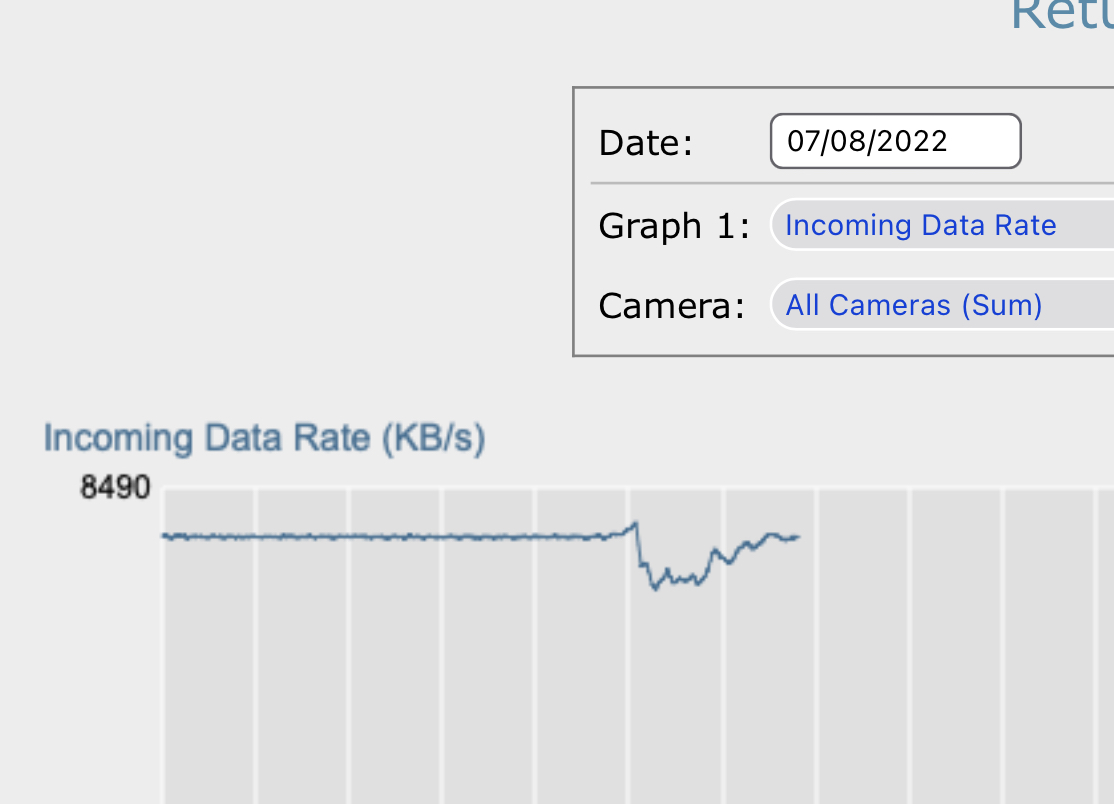
I have a question about incoming data rate. I have all cameras set to high frame rates. I like the very smooth playback. On the dashboard I’m seeing approximately 8500 KB/s as the sum of all cameras. See attached screenshot.
I want to make sure my math is correct. Is this approximately 10% of my network capacity? I have a 1GB lan. I am just trying to picture how much capacity I’m using. Is this excessive or even little usage? I’ve seen no issues whatsoever. There are only two people on the home network. My wife and myself.
Thanks again. I greatly appreciate your quick and informative responses.
Marty
-
Hi Marty, great to hear that the 1s trigger time has cut down the false-positive rate. I can reassure you that with this setting, false negatives (missed events) will be very rare.
As for your network question: 1Gb/s (gigabits per second) translates to 125MB/s (megabytes per second) - minus 10% for IP/TCP overheads gives you 112.5 MB/s real-world network performance. According to your screenshot, your camera traffic is just under 8.5 MB/s, so this is just under 8% of your network capacity. This is not at all excessive for 16 cameras that are running at high frame rates and resolutions, and you shouldn't notice any significant slowdown of your network due to this.
-
Ben, thanks so much for your quick and informative response. You confirmed what I thought in that I was using approximately that much bandwidth and that it's no issue whatsoever. I absolutely love SecuritySpy and even if I was a fulltime Windows user SecuritySpy would be the one reason to have a Mac.
-
That's great. Many thanks for your comments about SecuritySpy, this is very much appreciated!

