SecuritySpy's NTP server no longer working?

I see in Activity monitor that nap-relay is running, but my cameras can not connect to my SS server to get the time.
And neither can the Mac itself:
% sntp localhost
sntp 4.2.8p13@1.3847 Tue Mar 12 03:54:59 UTC 2019 (2)
kq_init: detected broken kqueue; not using.: No such file or directory
localhost 127.0.0.1 no UCST response after 5 seconds
localhost ::1 no UCST response after 5 seconds
Running SecuritySpy 5.4.0 on macOS Monterey 12.2.1
Comments
-
I checked mine, and also used the Camera's 'Test' button to check mine. Neither worked. I selected to re-install the Time Server, and it started working again. Maybe SecuritySpy should add this to its checks and email if its not working. My cameras were several seconds off.
sntp: Exchange failed: Timeout
sntp_exchange {
result: 6
header: 00 (li:0 vn:0 mode:0)
stratum: 00 (0)
poll: 00 (1)
precision: 00 (1.000000e+00)
delay: 0000.0000 (0.000000000)
dispersion: 0000.0000 (0.000000000)
ref: 00000000 (" ")
t_ref: 00000000.00000000 (0.000000000)
t1: E5C2B67C.92F7A0B5 (3854743164.574090999)
t2: 00000000.00000000 (0.000000000)
t3: 00000000.00000000 (0.000000000)
t4: 00000000.00000000 (0.000000000)
offset: FFFFFFFF8D1EA4C1.B6842FA580000000 (-1927371582.287045479)
delay: FFFFFFFF1A3D4983.6D085F4B00000000 (-3854743164.574090958)
mean: 0000000000000000.0000000000000000 (0.000000000)
error: 0000000000000000.0000000000000000 (0.000000000)
addr: 127.0.0.1
}
sntp: Clock select failed
-
BTW, I meant ntp-relay, stupid auto-correct.
Uninstalled the time server from the menu then re-installed it.
No change. 😪
-
I'm not sure what could be wrong here - all looks to be working in our testing. Are you running any kind of connection-blocking software that could prevent outgoing connections to the Internet from working perhaps - something like "Little Snitch"?
-
Hi Ben, I decided to leave it for a while waiting for new machine to arrive. I've now switched over to a new Mac Studio Ultra (wow!!!). Started from scratch, just copied the folders across as per the FAQ.
Did install NTP from SecuritySpy menu. But cameras still fail to connect.
Activity Monitor shows ntp-relay running.
% sntp localhost
...
sntp: Exchange failed: recv failure
sntp_exchange {
result: 7 (recv failure)
SS version 5.4.1. macOS 12.3.1
-
You are totally correct Ben. I turned on this rule in my Sophos UTM (firewall) to allow internal traffic to contact external servers on port 123 and now it works:
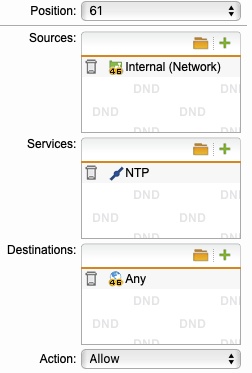
Still get the recv failure, but then the +/- difference at the end:
sntp: Exchange failed: recv failure
sntp_exchange {
result: 7 (recv failure)
header: 00 (li:0 vn:0 mode:0)
stratum: 00 (0)
poll: 00 (1)
precision: 00 (1.000000e+00)
delay: 0000.0000 (0.000000000)
dispersion: 0000.0000 (0.000000000)
ref: 00000000 (" ")
t_ref: 00000000.00000000 (0.000000000)
t1: E5F76CFC.03C7E6B3 (3858197756.014768999)
t2: 00000000.00000000 (0.000000000)
t3: 00000000.00000000 (0.000000000)
t4: 00000000.00000000 (0.000000000)
offset: FFFFFFFF8D044981.FE1C0CA680000000 (-1929098878.007384539)
delay: FFFFFFFF1A089303.FC38194D00000000 (-3858197756.014769077)
mean: 0000000000000000.0000000000000000 (0.000000000)
error: 0000000000000000.0000000000000000 (0.000000000)
addr: ::1
}
+0.073790 +/- 0.319128 localhost 127.0.0.1
Hope this helps you @Senna_F1
Thanks again for your help Ben.
James.
-
Thanks @jlbrown, glad you found this solution. I'm not sure why it's saying "recv failure" and then giving you a valid time stamp, I haven't seen this before. But hopefully this is just a quirk of the sntp tool, and the server is actually working. Our NTP server process needs to communicate with Internet NTP servers in order to get a timestamp and give a reply, so it does need to be able to make outgoing UDP connections on port 123 and to receive replies.

