SecuritySpy Screensaver

The download link for this appears to be broken - is anyone aware of another link to it?
Comments
-
Hi David - sorry about this, we're in the process of updating the screensaver and making it available again. I'll post back here when this is done.
-
Any news on this? - its been a while
-
Hi David, apologies for the delay, you can now download the SecuritySpy Screen Saver here.
-
This is a Nice Thing.
I have cycles back in the commons Mini! much lighter weight than a full SSpy instance.
Thanks Ben. -
Always wondered… but how do I set it up?
-
Rex: double-click on the screensaver to install it on your computer. In the Desktop & Screen Saver system preference (which will open automatically when you install the screensaver), click the Options button and enter the details of the SecuritySpy server(s) you want to view (address, username, password). That's it really!
-
Thanks, Ben. Just can't figure it out. Never mind.
-
Hi Rex, here's a couple of screenshots to demonstrate:
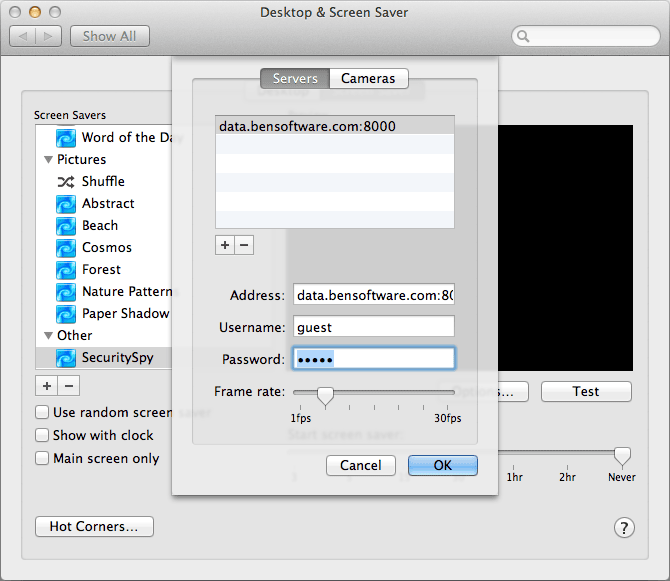
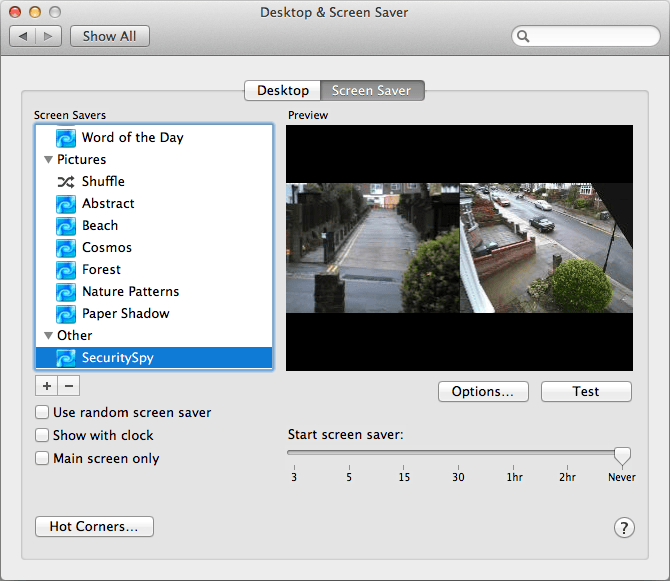
-
I've tried to set this up but can't get it to work. I can get to the server view my browser but it won't work for the screen saver or the dashboard widget. I've used the instructions listed above to no avail. Is there an issue with this screen saver and the dashboard widget now?
-
The screen saver has been running quite nicely since my post on the 25th.
Sometime this Californian afternoon it has stopped displaying the SS server to which it was connected, The screen saver still launches, and displays the little clock display wandering across the screen.
I had swept the server's video setup ensuring H.264 feeds, but I'm also sure the machine running the screen saver was happily tracking along.
aside from the release announcement is there some other thing I may of missed which would do this? -
(
I have restarted the computer with the screen saver.
I have removed and reentered the screen saver's values for the Security Spy server.
I have restarted the Security Spy server
) -
gah never mind!
-
Hmm this is odd, I can't think of any reason why this would be happening. Have you tried completely removing the screensaver and reinstalling it? Use the minus [-] button in the Desktop & Screen Saver system preference to remove it, then download and install it again.
-
No Ben, all is good. Firewall Fun - my bad.
-
I am running 10.9.2 on both the SecuritySpy server and the iMac I want the screensaver to be on. I have successfully installed the screensaver widget and can see the cameras when I select 'preview' from the widget and in the widget itself. However when the screensaver actually runs by me using a hot corner or leaving the iMac idle all I get is a blank screen. I have rebooted and reinstalled everything I can and still the same result! Any ideas? thanks!
-
Makes absolutely no sense to me. Thanks anyway.
-
A *tutorial* on how to do get a server/screensaver connection established would be very helpful at this stage. I know there are settings to be made in SecuritySpy, but what/where might they be? Thank you.
-
Hi Rex, that's a good idea, I'll put a tutorial together shortly and will post back here when it's done.
-
My english is not as good
i also need tutorials for screensaver and widgets Tks -
really confused on server Address
Bonjour name - DNS I - Mac ip ??? -
Hi robby55 - sorry we haven't got round to putting together tutorials yet, I'll make sure that's done soon.
If you are connecting to SecuritySpy over a local network (LAN) then you can use either the SecuritySpy Mac's IP address or its Bonjour name. If you are connecting over the internet then you'll need to use the DDNS name.
If you are using the IP address or DDNS name, your Mac will need a static IP address on your local network. -
Same thing here although I'm not really sure which version of screensaver I'm using. If I don't set up a password in web server settings I can have this screensaver on any of my networked computers. Once I check that box, blank screen, no server no camera list.
-
The screensaver does not connect to SecuritySpy over HTTPS/SSL, correct?
-
rhosk you are correct, it's currently HTTP only. However this shouldn't be difficult to add, I'll put it on the "to do" list and hope to have this done soon.
-
Works great so far on the same LAN as the SS server, but I'm with rhosk - https is the only way this'll work when I'm not on site (which is when having the remote view is so useful.)
-
Hi All,
We have now updated the screensaver with SSL (HTTPS) support, and created a new tutorial for how to set up the SecuritySpy Screensaver.
Hope this helps! -
I have today downloaded screen saver on my MacMini which I use as the server and also downloaded it on my MacBook Pro. It works perfectly. However, shouldn't a screen saver be animated as it isn't really any different to viewing SS full screen. Alternating the cameras or moving them the around the screen would make more sense. One for the pot Ben?
-
With web server password enabled and this new tutorial, I still cannot get the feed from the web server for my screensaver. The only workaround I can make work is to run a "screensaver server" from another computer to use solely on my home network which is probably not kosher but it does work. Any thoughts on what my problem might be Ben or Rod? I like the screensaver but it's useless with the web server password enabled, at least for me.
-
Hi @martyestrada - are you saying that without authentication enabled in the web server the screensaver works, but if you enable authentication then this makes it stop working? Have you checked the permissions of the web server account, for the username/password credentials that you are entering into the screensaver, to make sure they allow live streaming of video for all your cameras?
