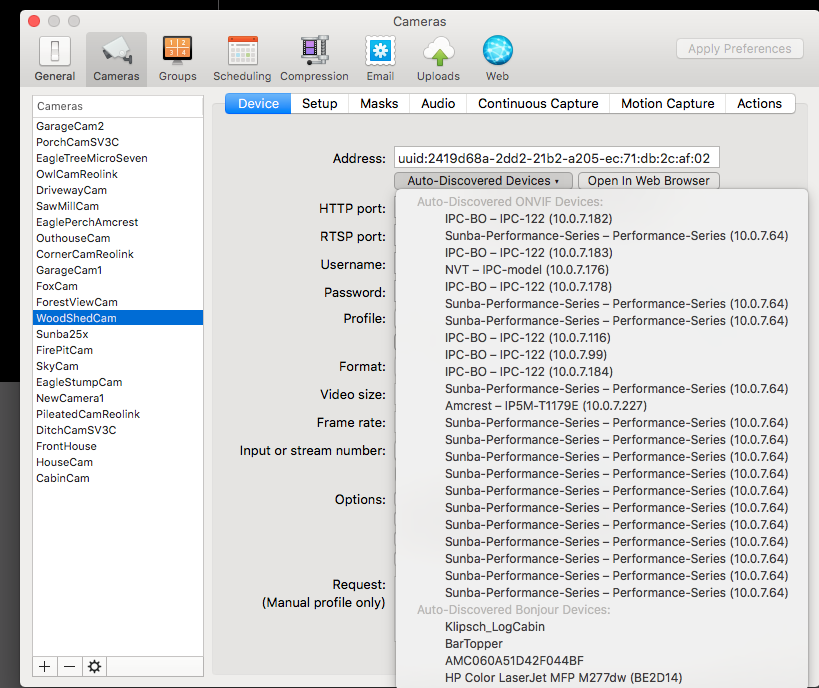
Sunba 625 camera shows up many times in auto-discovered dropdown.

Got a new Sunba camera...attempt to connect - and see MANY instances of the IP/camera listed. This is same in SS v4 and v5 - 2 different computers.
Picking one of them will connect to camera....but on restart - often does not connect again until another instance of the dropdown is picked...same IP still.
Only camera to have done this...
Comments
-
We have seen this a couple of times with some cameras that don't handle ONVIF auto-discovery correctly in the following way:
Discovery works by SecuritySpy sending out data packets to the network that ask all ONVIF devices to reply with their names and addresses. In these replies, each device is supposed to specify a UUID identifier, which is a fixed, unique identifier for that device. But, what is happening here is that the camera is replying with a different UUID each time, so it looks to SecuritySpy like a different camera. So this camera is basically sending a useless UUID that can't be used for anything, resulting in the duplications in the list and failure of the auto-discovered address for the camera.
The solution is to log onto the camera using a web browser (currently at the address http://10.0.7.64), locate its IP settings, and set it to a fixed/manual IP, for example 10.0.7.10, with subnet mask 255.255.255.0. Then, rather than use auto-discovery for this camera in SecuritySpy, simply enter this static IP address into the Address box in the window shown above.
Meanwhile, we will take steps to identify this fault and will prevent the duplicate entries in the list in the next SecuritySpy update.
-
Not sure if this is part of the same or different issue. But it never happened in the long time using SS - the UUID for other cameras are no longer working to connect to the cameras. Most or all the cameras (8-10 per computer) will be not connecting...If I go in an manually type in the IP the appear instantly and work for a period (days or week)...The other cameras (Sunba, a few Amcrest and Reolink) that do not connect via the UUID - also do not appear in the discovered listing...but finding the ip...typing into the ADDRESS field and the connection returns instantly.
At first I thought I had network issues...but running OBS and other software - the cameras did not disappear or change IP. I have some cameras set with fixed IPs such as new Sunba and still occurs even though the old ip is same as new ip...
-
If a camera doesn't appear in the "Auto-Discovered" list, then it cannot be auto-discovered, and you'll need to use the camera's IP address.
It's surprising that you're saying that some Amcrest and Reolink cameras aren't being auto-discovered. But it does require that ONVIF is enabled in the camera. Could it be that ONVIF has been turned off in these cameras?
When using an IP address in SecuritySpy, this must be a static IP address that you have manually assigned to the camera, so that it doesn't change. Then the IP address will work indefinitely. If you are comfortable assigning static IP addresses in this way, then this is the best way to add cameras as this is always going to be more reliable than any kind of auto-discovery method.
