Triggers not using mask for vehicles

I am having an issue with one camera where it is ignoring the trigger mask and reporting on vehicles. Of note, it does not always report on vehicles but that might be because I have the threshold set to 100.
Is this a known issue and more importantly, is there a set of steps to correct it?
I presume the steps will be to delete the camera and then re-add it. My hope is that there is something simpler than that.
Comments
-
It's difficult to advise you from this description - could you please email us at support@bensoftware.com and include screenshots to demonstrate the problem, and we will help you with this directly. Thanks.
-
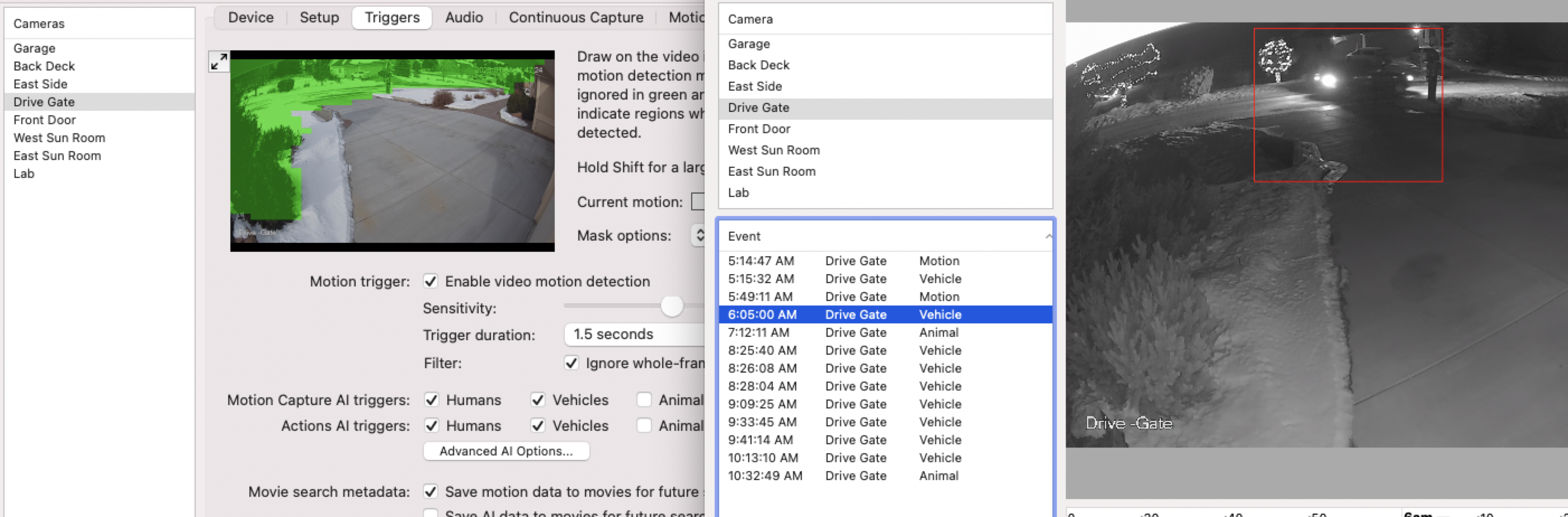
I have the same issue. I have a lot of false triggers for vehicles in the trigger mask for cars: default thresholds.
-
I understand why this seems counterintuitive, but this is working as designed.
There are two stages in SecuritySpy's motion detection process: the first is pixel-based motion detection that looks at changes in pixel values to determine if there is motion happening somewhere in the frame, and the second is AI-based object detection that then classifies the area of movement as a human, vehicle, animal or nothing.
The key thing that you are running into is that the mask applies only to the pixel-based motion detection; once motion is detected, the whole area of movement (even the bits behind the mask) is sent to the AI for classification. The reason for this is to avoid partial bits of people/animals/vehicles being sent to the AI, which would reduce the classification accuracy.
So there is a tradeoff here between respecting the mask as drawn, and classification accuracy. But perhaps we have made the tradeoff too far towards accuracy, which is clearly leading to results that don't seem right. Therefore, in the latest beta version of SecuritySpy (currently 5.5.4b6), we have made some tweaks which should result in a more balanced approach, using the mask to restrict what gets sent to the AI, and should give results more in line with what is expected. So please install this and report back once you've had a chance to test it.
-
Thanks Ben
That helps a lot - before I try the beta can you give me the expectations of a mask? If I have motion in the mask it is simply that motion with no intelligence. So if I had a car which is going down the street at night with the lights on and the mask is the street it would still trigger because all of the head lights going around the mask (curb, sidewalk, grass). Wouldn't it be betters to exclude the mask in the trade off to the AI. Meaning that the AI could not recognize the vehicle? OBTW this really helps me understand the other triggers relative to bushes moving, snow storms, bugs on lenses, - overwhelming motions....
Dale
-
The new software seems to have helped (Number of vehicles in the trigger mask went down - as a percentage of cars detected vs cars that pass about 50% - There is only about 10 cars a day) - I am going to increase the mask size to see if that helps
-
Hi Dale, good to hear this helps. Yes, increasing the mask size will improve the situation for you. Even with the new beta, the image that gets sent to the AI may include a bit of the image behind the mask due to constraints about the size and shape of images that the AI can process (e.g. if the detected area is very wide and short, SecuritySpy has to increase the height in order to generate an image that the AI can digest, which may take the top of it a bit into the masked area).
Yes, motion is being detected due to the spillover of things like headlights and shadows into the non-masked area.
-
Is there anything that can be done with outdoor shadows in the wind, or snow passing through a lens. Seems that if we have any windy conditions I am cleaning out all of the bad files recorded. Thanks for all of the hard work - this can't be easy
-
Maybe post a sample video/picture to see how it can be improved
-
probably can't do much for snow, but what outdoor shadows you talking about? car and human/animals shadows?
-
Enabling the AI is the main thing that will reduce false positives (i.e. human, vehicle and/or animal detection). If you aren't using the AI, but instead are using regular motion detection, then an outdoor camera will indeed generate a lot of false positives in windy/snowy conditions. We have designed SecuritySpy's motion detection feature to be as resistant to this as possible, but there is an unavoidable tradeoff between sensitivity to real events (recall) and resistance to false events (precision). Generally, if you increase one you decrease the other.
I would suggest that you shouldn't have to manually clear out the false-positive recordings. Simply provide enough space for SecuritySpy in order to get a good amount of recording history, and let SecuritySpy automatically clear out old recordings when it needs to. Manually clearing recordings is time consuming and unnecessary if you have enough storage space.
This section of the user manual contains some further useful advice: Achieving Effective Motion Detection.
-
Thanks Ben,
That is a great reminder to tweet my AI settings. I recently setup a scenario to ring a doorbell sound when a Person was detected by a specific camera. After doing so, one Magpie was triggering the event every day (almost consistently at the same time and in the same place). Though I now have a different bonus scenario to use, I have upped the AI setting slightly to see if it can eliminate the problem. In this case though, should I:
- Up the Animal detection so the system recognizes the Magpie as not human?
- Or up the Human to not recognize the Magpie?
- Or up both slightly?
-
I'm surprised that a magpie was detected as being human - we have found that some dogs look like humans to the AI, but never birds as they look quite different! Note that if you enable the animal AI for Actions, then the alarm sound will be triggered by animals as well as humans - could this have been what was happening?
If you want to trigger actions on a human with high probability, enable the human AI for Actions, disable both the animal and vehicle AI for Actions, and set the human trigger threshold to 80.
-
Only Human is toggled in the actions so it definitely is being seen as a human. This magpie (I am suspecting it is the same one) has given us some very interesting pictures when in flight in front of the camera. The latest shots are with it on the ground but it is likely after it flew into the scene.
I will adjust the threshold to 80 (currently at 63, up from 50).
-
We will work to add more birds to our dataset that we use to train the AI algorithm, which will increase its ability to differentiate between birds and humans in the future. To help us in this endeavour, please enable the option in the General Preferences in SecuritySpy to anonymously share images from your cameras with us (or, at least this one camera), as this will help us to gather the data that we need.
-
Will do.
-
Funny enough pigeons sometimes get detected as humans for me

-
Hi @Ldalep FYI we have just released a 5.5.4 update to SecuritySpy. From this version onwards, if you want the AI object detection to respect the mask, you have to enable the option at Preferences > Cameras > Triggers > Advanced Trigger Options > Motion mask also applies to thumbnails and object detection.
-
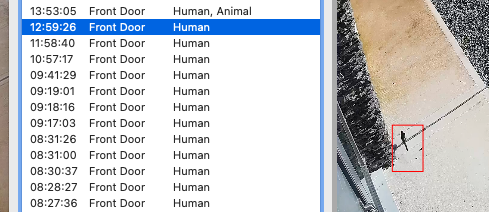
For me I get about 20 a day where birds detected as people, usually black and white pattern birds, I guess the pattern puts off the AI.
Usually wagtails but magpies too:
I have the option to send the pictures up anonymously enabled so hopefully your dataset is growing for the models
-
Thanks @eoinoc for allowing images to be shared with us. Currently SecuritySpy's human detector is 97% accurate on average, but we have seen examples like this where specific frequently-occurring objects (in your case these birds) trip up the AI and produce incorrect results. The more images we have in our dataset, and the greater variety of these images, the better we can make our AI algorithms going forward. So we appreciate any customer who allows image sharing.
-
Have to say, I adjusted my AI up to 63 (never got to the 80) and haven't had a false detection since. It might just need a slight nudge, and given 97% accuracy would be in alignment.
-
Mine are were actually at 75 for human, 70 for vehicle and 50 for animal.
I had animal set to 50 to increase the chances of being marked as animal before human for pet dog and these birds.
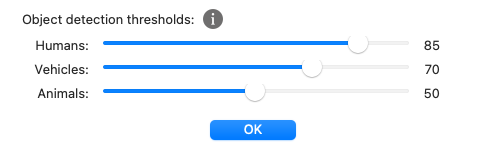
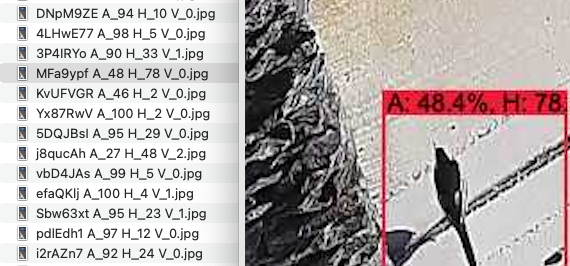
Looking at the AI predictions it said the above example was 78% human, and 48% animal, so I have changed it now to 85% and will see how it goes. I have seen the odd bird get 100% human 🐦️🚶


