Scrypted for HomeKit with Security Spy

Breaking this into its own thread from the "Any using Homebridge to view their SecuritySpy cameras in HomeKit... how's the experience?" discussion.
I'm finding with the latest 0.0.159 update to Scrypted that things are working far better, particularly due to the introduction of this "Add H264 Extra Data" option which eliminates the need to transcode the stream from SecuritySpy. I've not looked in to what they're adding, but it works. Video generally starts within a few seconds or less of tapping the image in the Home app.

One thing it does still complain about is the pcm_u8 format audio being output by SecuritySpy. It wants this in AAC format and the stream into HomeKit does fail otherwise. Happily, this can now be controlled separately from the video transcode and the overhead is minimal.
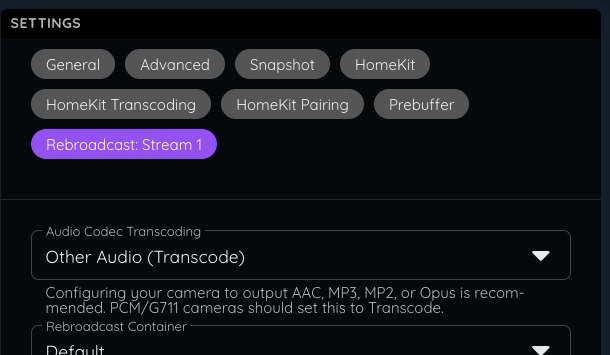
Overall this latest update is great. For me this is just a convenience thing for family so they have the lowest possible barrier to viewing the home cameras, with SecuritySpy doing all the heavy lifting.
For those interested in trying it out, I use this for the Snapshot:
http://127.0.0.1:8081/++image?auth=[token]&width=2560&height=1920&cameraNum=0
And this for the General "RTSP Stream URL":
rtsp://127.0.0.1:8081/stream?auth=[token]&width=1280&height=960&cameraNum=0
I'm running SecuritySpy and Scrypted on the same system, hence the localhost IP (which is now working again) and my native camera resolution is 2560x1920 (4:3) which I halve to 1280x960 for HomeKit.
Annoyingly, I still can't find a way to trigger a linked dummy sensor (for HomeKit Secure Video support) over HTTP or command line means. This would be ideal as SecuritySpy or a sensor connected to another system could then be used to fire up backup recordings in HomeKit.
Comments
-
Little followup, I discovered a means by which recordings can be triggered in Scrypted from SecuritySpy.
Scrypted offers a "Mail (SMTP) Plugin" which can be used as an extension to the "Dummy Switch Plugin", which in turn is used to add sensor capabilities to the cameras added through "RTSP Camera Plugin". It runs an smtp server on your system and allows email addresses to be set up for each of the sensors, which will catch incoming mail and search it for trigger text.
Using this I was able to point the command line program "sendemail" to the SMTP server and trigger sensors to activate or deactivate with the following command:
sendemail -f securityspy@localhost -t backgarden@localhost -s localhost -o tls=no -m on
Note this is "sendemail" and not the usual "sendmail" as "sendemail" can be configured with which SMTP server to use inline, rather than messing with config files. It can be installed with Homebrew.
To get SecuritySpy to do this on our behalf we use the "Run script" action with something like this in the AppleScript file:
do shell script "sendemail -f securityspy@localhost -t backgarden@localhost -s localhost -o tls=no -m on"
Worth it? Well, not quite for me at the moment. Seems my camera formats aren't something HomeKit is happy having shoved in its face, so they don't appear anywhere, though if you set Scrypted to use the "Save HomeKit Video Clips" option you can see they're being correctly triggered and recorded. This was just an experiment anyway, so I'll leave it here for somebody else to pick up if they fancy.
-
Following along. Setup Scrypted with HSV a few weekends ago to check this out. For me, there's a few benefits over SS itself:
1.) get videos and that rich notification of motion/objects to any Home app user in the house
2.) get rich notification for ANIMAL objects which SS doesn't do at all (despite requests)
3.) get notifications without hassling with port forwarding and remote connection setup of SS app (not difficult, and thank you SS for making this as easy as you probably can.... it's just a fact that it takes work and maintenance)
What I would really like to do ultimately is to build notifications based on specific object types of person, vehicle, and animal so that if vehicle is seen anytime, I get notified. But if person is identified during the day when kids are running around, I don't get notified. But after dark, I would get notified for people and vehicles. And if an animal, I'd get a silent notification only. I would love to watch bear cross the driveway at some point but don't need to be woken up in the middle of the night for it.
Haven't cracked the nut of granular notifications for different object types that include animals, yet.
-
I’m working on Scrypted integration as well but not from SS - rather direct from cameras…. Hum. Now something more to play with!
would be awesome if SS just had the HKSV hooks themselves!