Timeout after computer reboot

1 rebooting the computer again
2 rebooting SS
3 IP Scanner, and Amcrest app recognizes video
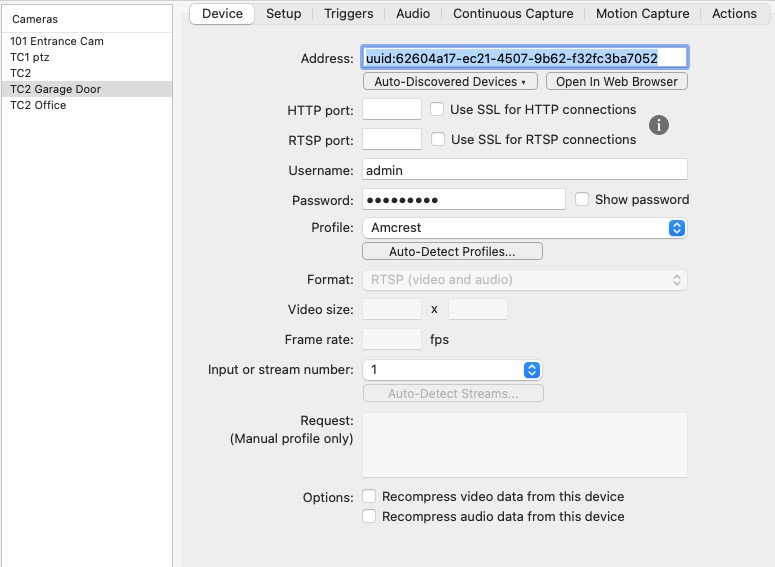
4 SS device ONVIF with atuo discovered devices it is NOT recognized.
Help
Comments
-
This issue seems to have returned. Tried to reboot the computer, SS, & camera, but to no avail. The video shows up on the native camera app.
06/19/2023 04:19:04 Error communicating with camera "TC2 Garage Door". Error from network device. The operation timed out. 5.5.8,70900,800
06/19/2023 04:49:04 Error communicating with camera "TC2 Garage Door". Error from network device. The operation timed out. 5.5.8,70900,800
06/19/2023 05:19:04 Error communicating with camera "TC2 Garage Door". Error from network device. The operation timed out. 5.5.8,70900,800
06/19/2023 05:49:04 Error communicating with camera "TC2 Garage Door". Error from network device. The operation timed out. 5.5.8,70900,800
06/19/2023 06:19:04 Error communicating with camera "TC2 Garage Door". Error from network device. The operation timed out. 5.5.8,70900,800
06/19/2023 06:49:04 Error communicating with camera "TC2 Garage Door". Error from network device. The operation timed out. 5.5.8,70900,800
06/19/2023 07:19:04 Error communicating with camera "TC2 Garage Door". Error from network device. The operation timed out. 5.5.8,70900,800
06/19/2023 07:49:04 Error communicating with camera "TC2 Garage Door". Error from network device. The operation timed out. 5.5.8,70900,800
-
The best thing to try here would be to set the camera to a static IP address on your local network, and then give this static address to SecuritySpy instead of the ONVIF "uuid" address that you are currently using. Static IP addresses are more reliable, and when using them, you can be sure they they will never change and therefore make the camera inaccessible at its previous address.
- Use our Network Device Finder app to locate the camera on your network
- Double-click on the entry in Network Device Finder to open its web interface
- Log on and locate its network settings
- Set it to a static address, and give it an address in the form A.B.C.D, where A.B.C is the same as all the other devices on your network (this is the "subnet") and D is a unique number from 0-254 that is not being used by any other device (and, ideally not close to any other device, i.e. outside the router's DHCP range).
- Specify 255.255.255.0 as the subnet mask, and optionally provide the router's IP address and DNS address of 8.8.8.8
- Then, provide SecuritySpy with the camera's static IP address
-
Never in all my life have I seen a camera reset its MAC address & gateway access. It's now working

